
Tasks sit in columns and move from left to right. You can see what is due today without a report and without asking.
Anyone who wants to know the status of a project asks. The person asked interrupts their work, gathers the information and answers. That costs both of them time, and a week later it starts all over again.
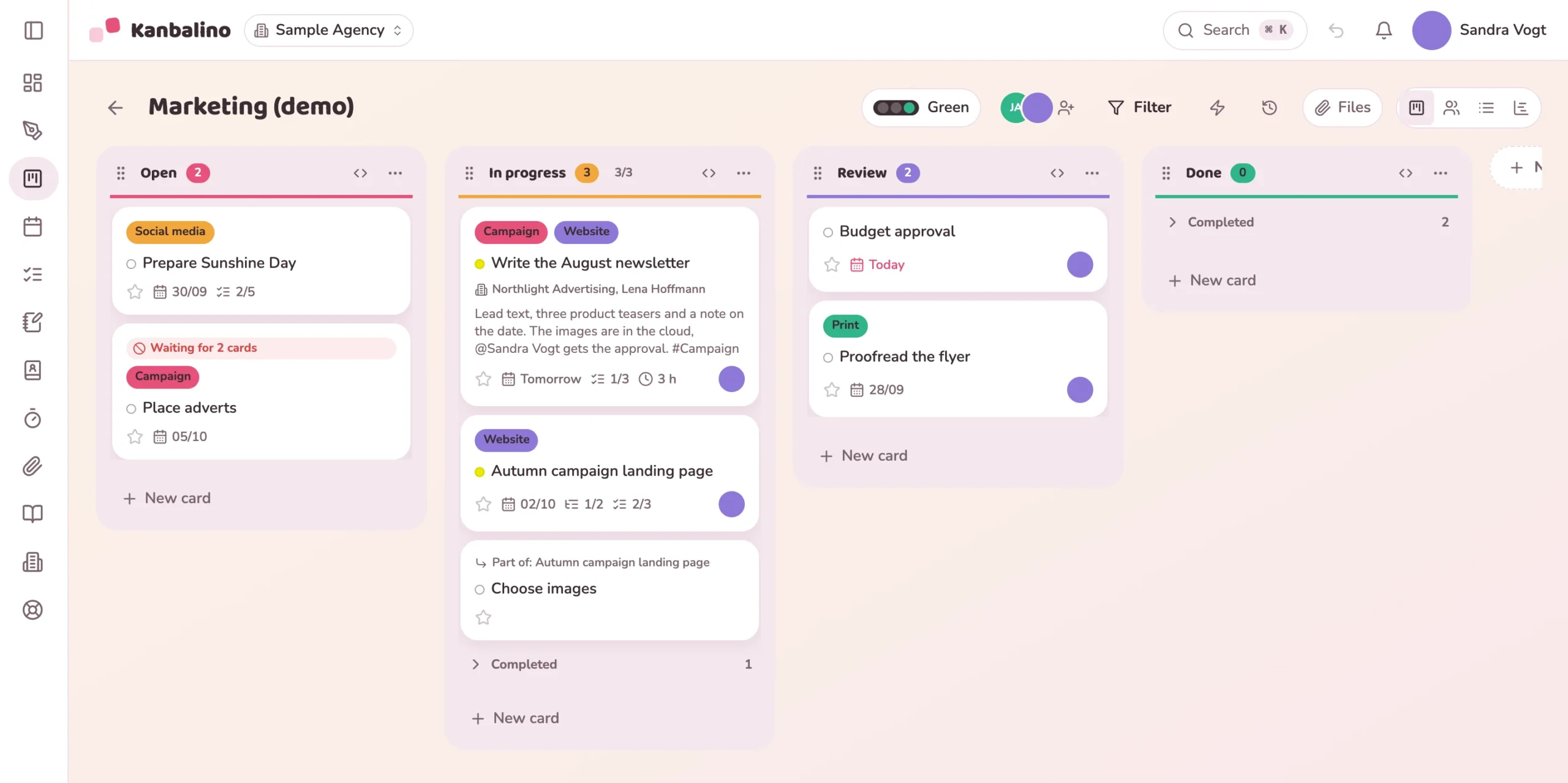
In Kanbalino every project has a board. Columns map your workflow, for example Open, In progress, Review and Done. Every task is a card that moves on by mouse, finger or keyboard. The card shows labels, the date, the assignee and the progress of the subtasks. One glance is enough.
Kanban is a method from agile project management: the work becomes visible, and a team only takes on new tasks when there is room for them. A good tool turns this into everyday practice without anyone having to study the method.
Every task is a card, every column a step in the workflow. The whole team sees the same status, whether in the office or out and about on a phone.
A limit per column shows where tasks pile up. Kanban does not ask who can start even more, but what should be finished first.
Comments, mentions and due dates sit on the task itself. Customers and partners take part as guests for free.
The view by person shows who is carrying how much. This way teams in companies of any size see where the flow gets stuck, and adjust columns and rules.
A Kanban board shows tasks as cards in columns that map the workflow, such as Open, In progress, Review and Done. A card moves from left to right until the task is done. That way the whole team sees the status without having to ask.
A WIP limit is a limit on simultaneous tasks per column. If there are more cards in the column than allowed, the counter in the column header changes colour, for example “4/3”. Moving cards remains possible: the limit is a hint and not a lock.
A subtask is a real card with its own status, its own assignee and its own date. A checklist item is just a tick inside the card. If a tick turns into more work, you convert it into a subtask with one click.
Three: the classic one by column, grouped by person (one column per person, dragging assigns) and as a list with compact rows. On top of that there are the calendar, timeline and My tasks across all boards.
Three boards with up to five people, permanently and without a trial period. With Premium, boards and members are unlimited. Guests cost nothing in any plan. All prices
Yes. Kanbalino reads the export of a Trello board, with lists, cards, labels, checklists and comments. Attachments stay in Trello, and every card concerned links to them.
One board from the backlog to “Done”. The limit per column shows when too much is in progress at the same time.
View
All of the business’s jobs on one board: the columns show what is new, what is in progress and what can be invoiced.
View
One board per client from the “Client project” template. A label such as “Waiting for client” shows where the project is stuck.
View
Create an account, name your columns, drag the first card. No credit card and no trial period that runs out.